
Separate numbers and responsibilities
WhatsApp Business needs a work account that the company controls on the primary device. Avoid turning an employee’s personal number into a permanent sales channel: after team changes, access and history remain tied to a private device. Document who owns the work number, reply rules and the procedure for revoking linked devices.
See the setup in Centrio
Screenshots show Centrio 3.5.1 with its Russian interface. Service names and the placement of the main controls help you follow the same steps in your language.

Open the service catalog
Click “+” in the left sidebar. Search for your messenger or email service and select its card.
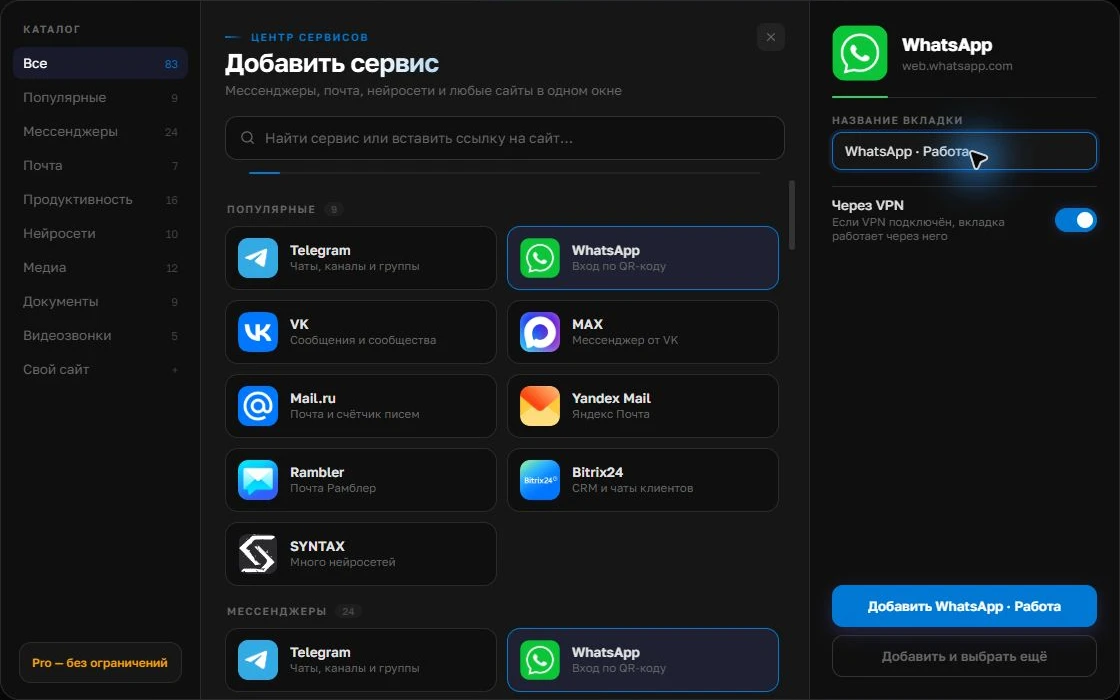
Open full-size screenshot ↗Give the account a clear name
On the right, choose a name you will recognize, such as “Work” or a project name. Add the service, then sign in through its usual website.
Open full-size screenshot ↗For a second account, add the service again. Sign in separately and verify the number or profile before your first reply. Adjust notifications to suit your work.
Build your own workspaceChoose your PC workspace
For one agent and one channel, the official WhatsApp Business service and its standard web linking may be enough. If you also need Telegram, MAX, email or a CRM, open them as separate services in Centrio. You can add personal WhatsApp as a second instance to keep logins separate.
- Name instances “Personal” and “Sales”.
- Keep work notification sounds only for the customer channel.
- Check that links in messages open as expected.
Check after signing in
Link the work account through the linked devices menu on the primary phone. Check the logo, company name, required chats and ability to send a test reply. Repeat for the personal number if you need it on the PC too. Separate sessions reduce accidental switching, but the agent must still check the active account before sending.
When Centrio is no longer enough
Centrio is useful as an individual work window: it does not assign enquiries to several agents, maintain customer records or build a unified history across channels. For shifts, SLAs or CRM sales, use a service with an official team integration. For one employee managing several channels of their own, a separate app may be simpler.
Frequently asked questions
Can I open personal WhatsApp and Business at the same time?
Yes, if they are two different accounts, each linked through the standard process in a separate session.
Does Centrio replace a CRM?
No. Centrio brings web services into one window; customer records and enquiry assignment remain the job of a CRM or omnichannel platform.
Sources and verification
Prepared by the Centrio editorial team. Below are official service pages and Centrio documentation. Feature availability depends on the app version and operating system.