
Start with Telegram’s own option
The official Telegram client lets you sign into multiple accounts and switch without signing out. For two numbers and occasional switching, that is often enough. It retains native client features that the web version may not reproduce. Do not install another program solely for a feature that already works for you.
See the setup in Centrio
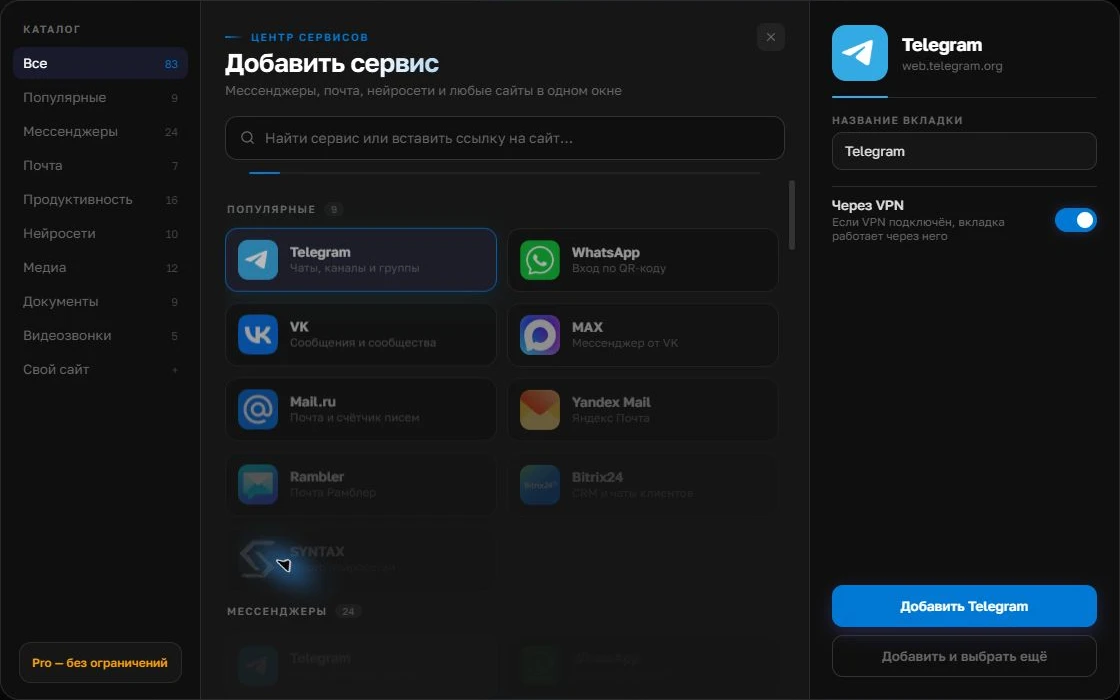
Screenshots show Centrio 3.5.1 with its Russian interface. Service names and the placement of the main controls help you follow the same steps in your language.

Open the service catalog
Click “+” in the left sidebar. Search for your messenger or email service and select its card.
Open full-size screenshot ↗Give the account a clear name
On the right, choose a name you will recognize, such as “Work” or a project name. Add the service, then sign in through its usual website.
Open full-size screenshot ↗For a second account, add the service again. Sign in separately and verify the number or profile before your first reply. Adjust notifications to suit your work.
Build your own workspaceWhen separate sessions are more convenient
If work Telegram must stay readily available alongside WhatsApp, MAX, Slack or email, add two Telegram instances to Centrio. Sign into each with its own number and name it by role. Do not confuse a service instance with a new Telegram account: numbers and login verification remain Telegram’s responsibility.
| Task | Approach |
|---|---|
| Only two Telegram accounts | Telegram’s built-in account switching |
| Telegram plus several web services | Separate instances in a work window |
| One list of all messages | A different product category is required |
Prioritise notifications
Keep a distinct sound for the channel carrying urgent enquiries and mute personal messages during work hours. After setup, ask a trusted contact to send test messages to both accounts and check whether you can distinguish them on the lock screen and in Centrio’s sidebar. If a notification fails to arrive, first check Telegram’s own settings and system permissions.
Limitations and security
Secret chats and some Telegram features do not carry over to the web version. If they are essential, use an official client that supports them for those conversations. On a shared computer, secure access with an operating system password and review active Telegram sessions. Two instances in Centrio use two Free slots; more services require Pro.
Frequently asked questions
Do I need Centrio for two Telegram accounts?
No. Telegram can switch between multiple accounts. Centrio is useful when you also want other messengers or email alongside them.
Are secret chats available in the web version?
Secret chats are device-specific and are not part of a standard web session. Use an official client that supports them.
Sources and verification
Prepared by the Centrio editorial team. Below are official service pages and Centrio documentation. Feature availability depends on the app version and operating system.