
Check the official sign-in options
Open the official MAX app or web version and check whether your version lets you switch between the required profiles. Messenger interfaces change; do not rely on old instructions with exact button positions. A second account needs its own active number and standard login verification.
See the setup in Centrio
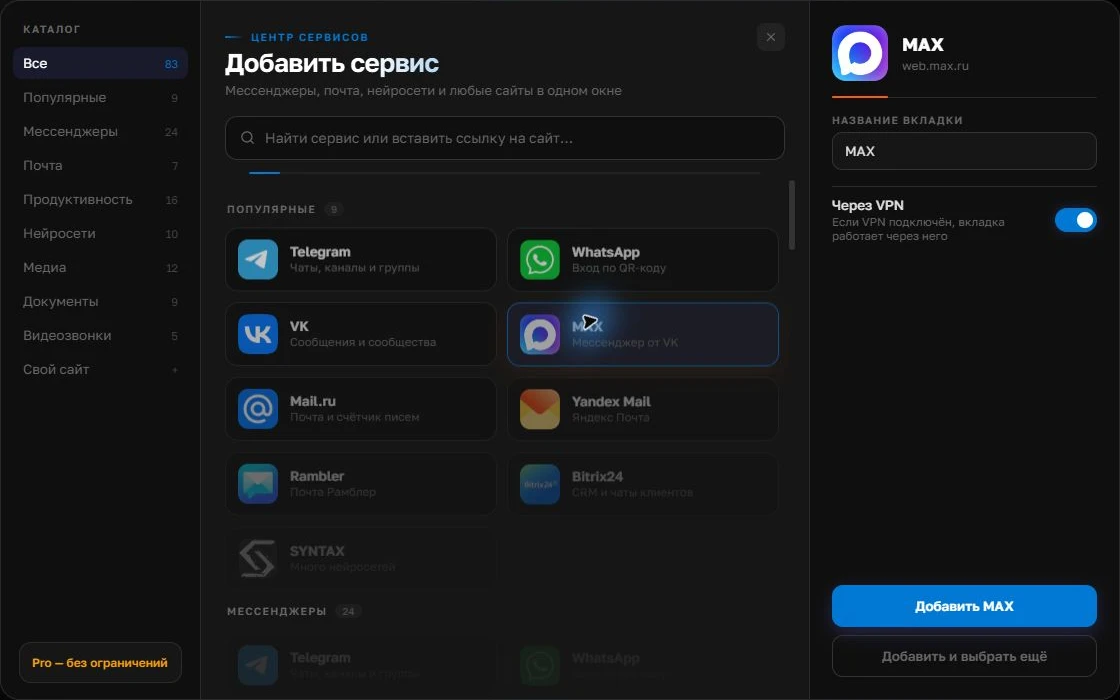
Screenshots show Centrio 3.5.1 with its Russian interface. Service names and the placement of the main controls help you follow the same steps in your language.

Open the service catalog
Click “+” in the left sidebar. Search for your messenger or email service and select its card.
Open full-size screenshot ↗Give the account a clear name
On the right, choose a name you will recognize, such as “Work” or a project name. Add the service, then sign in through its usual website.
Open full-size screenshot ↗For a second account, add the service again. Sign in separately and verify the number or profile before your first reply. Adjust notifications to suit your work.
Build your own workspaceKeep both accounts on your PC
For the web version, you can use two browser profiles. In Centrio, add MAX twice and sign into a different account in each instance. Name them by purpose, such as “Family” and “Customers”. After signing in, check the avatar and latest test message: similar tab names do not guarantee the right account.
- Connect the first MAX account normally.
- Add a second instance with a separate session.
- Check login and notifications in both.
Other services and limits
If you need Telegram or email alongside two MAX accounts, a third service fits in Free. Multiple projects, folders and split screen belong to Pro. Centrio does not merge two chat lists into one feed or transfer history between numbers. Its role is to provide a clear workspace for your own web services.
When this method will not work
If MAX’s web version lacks a feature, a second window will not add it. Test calls, file transfers and notifications on your device before switching. Separate sessions alone cannot support shared agent work: access permissions, conversation assignment and an activity log require a specialist product.
Frequently asked questions
Can I create a second MAX account inside Centrio?
No. You first need a separate MAX account; Centrio only opens an independent web session for it.
Will both chat lists be visible at once?
You can quickly switch between instances in one window; simultaneous viewing in split screen is available under Pro’s terms.
Sources and verification
Prepared by the Centrio editorial team. Below are official service pages and Centrio documentation. Feature availability depends on the app version and operating system.