
Decide why you need a second account
One Discord account with adjusted notifications may be enough for personal servers and community work. A second account makes sense if you need different roles, a separate profile or separation between personal history and professional activity. Check that creating and using these accounts complies with Discord’s rules and the community’s rules.
See the setup in Centrio
Screenshots show Centrio 3.5.1 with its Russian interface. Service names and the placement of the main controls help you follow the same steps in your language.

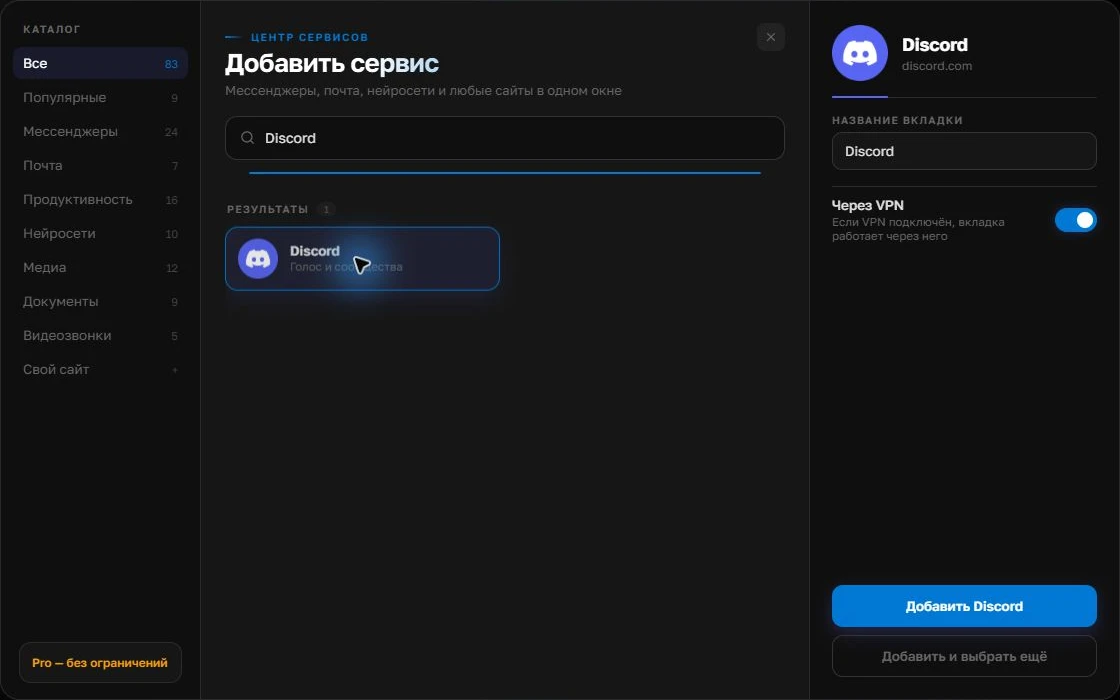
Open the service catalog
Click “+” in the left sidebar. Search for your messenger or email service and select its card.
Open full-size screenshot ↗Give the account a clear name
On the right, choose a name you will recognize, such as “Work” or a project name. Add the service, then sign in through its usual website.
Open full-size screenshot ↗For a second account, add the service again. Sign in separately and verify the number or profile before your first reply. Adjust notifications to suit your work.
Build your own workspaceTwo reliable ways to sign in
Open a second web login in another browser profile or add Discord twice in Centrio. Each Centrio instance keeps its own session; after signing in, name them “Personal” and “Moderation”. Do not copy cookies between accounts or store backup codes in unprotected notes.
Test your workflow
In the moderator account, open the required server, check permissions and make sure a test mention triggers a notification. Mute the personal account while on duty if needed. If your team also uses Telegram or email, add them alongside. Two Discord instances leave one Free slot; folders and additional capacity require Pro.
- Confirm the active profile.
- Check a test mention.
- Set sounds by priority rather than habit.
Web features and security
Voice, streaming and other specialised Discord features may behave differently in the web client than in the official app. Test them on your operating system before changing your usual workflow. On a shared computer, close unneeded sessions and use the account’s own security controls; Centrio’s PIN only restricts access to its window.
Frequently asked questions
Does Centrio create a second Discord account?
No. It opens a separate web session for an existing account.
Will the two accounts’ servers merge?
No. Server lists, messages and permissions remain with their respective Discord accounts.
Sources and verification
Prepared by the Centrio editorial team. Below are official service pages and Centrio documentation. Feature availability depends on the app version and operating system.