
Choose the right VK account
Personal conversations, community messages and page administration are different tasks. First check which sections your profile can access in the official VK web version. If you reply on behalf of a community, make sure you actually have the necessary permissions. An aggregator neither grants permissions nor changes the social network’s interface.
See the setup in Centrio
Screenshots show Centrio 3.5.1 with its Russian interface. Service names and the placement of the main controls help you follow the same steps in your language.

Open the service catalog
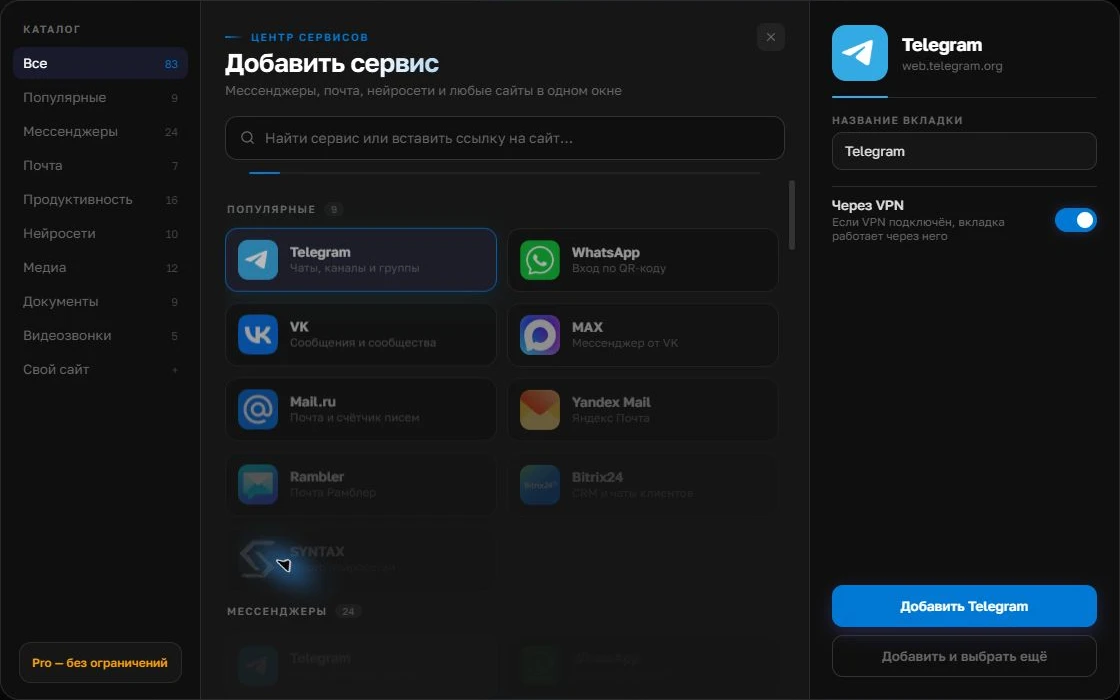
Click “+” in the left sidebar. Search for your messenger or email service and select its card.
Open full-size screenshot ↗Give the account a clear name
On the right, choose a name you will recognize, such as “Work” or a project name. Add the service, then sign in through its usual website.
Open full-size screenshot ↗For a second account, add the service again. Sign in separately and verify the number or profile before your first reply. Adjust notifications to suit your work.
Build your own workspaceBuild your work panel
Add Telegram and VK as separate services in Centrio. Sign into the right accounts and name them by role: “Telegram — Customers”, “VK — Community”. If you also have a personal VK account, add it as a separate instance to avoid confusing senders. Three services fit in Free; project folders are available in Pro.
Test messages, not just login
Ask a colleague to send a test message in Telegram and VK messages. Check that each notification is noticeable, opens the correct chat and that restarting does not require another sign-in. If only one service shows notifications, check its permissions and settings separately. A generic system sound does not tell you whom to answer.
- Name tabs by audience.
- Keep sound for the urgent channel.
- Manually check community messages once a day.
The solution’s limits
Centrio does not combine the platforms into a single queue or assign conversations to employees. A large support department needs procedures or a specialist service. But for one person managing several channels of their own, a separate panel reduces switching and helps keep work apart from personal browser tabs.
Frequently asked questions
Can I reply on behalf of a VK community through Centrio?
If your account has the appropriate access in VK’s web version, it will also be available inside Centrio. VK controls the permissions.
Will Telegram and VK become one messenger?
No. Centrio unifies the work window, not the protocols or conversation histories.
Sources and verification
Prepared by the Centrio editorial team. Below are official service pages and Centrio documentation. Feature availability depends on the app version and operating system.