
Do not confuse a workspace with an account
Slack creates a separate account for each workspace, even if you use the same email address. Accept each new workspace invitation through the standard process. Before setting up an aggregator, check that all invitations are visible in official Slack and that you know which messages belong to your team and which to clients.
See the setup in Centrio
Screenshots show Centrio 3.5.1 with its Russian interface. Service names and the placement of the main controls help you follow the same steps in your language.

Open the service catalog
Click “+” in the left sidebar. Search for your messenger or email service and select its card.
Open full-size screenshot ↗Give the account a clear name
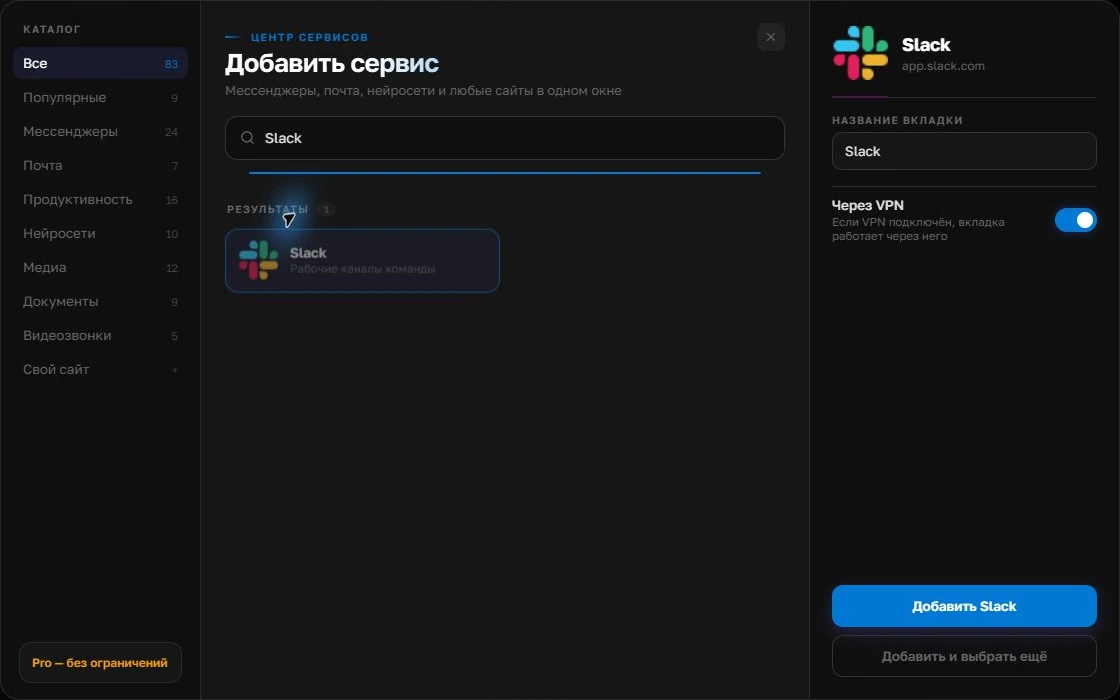
On the right, choose a name you will recognize, such as “Work” or a project name. Add the service, then sign in through its usual website.
Open full-size screenshot ↗For a second account, add the service again. Sign in separately and verify the number or profile before your first reply. Adjust notifications to suit your work.
Build your own workspaceTry Slack’s own tools first
The official Slack desktop client lets you switch workspaces and open separate windows for channels and conversations. If you spend most of the day in Slack, that may be enough. Things become harder when Gmail, WhatsApp, Telegram, a CRM and a calendar must always be nearby: then you are managing many apps, not just multiple Slack workspaces.
| Your workday | Approach |
|---|---|
| Mostly Slack | The official client and its windows |
| Slack plus email and messengers | A shared work window with separate services |
| Cross-workspace archive or search needed | Check Slack’s own features and company policies |
Organising in Centrio
Add workspaces as separate services if web sign-in and company policy allow it. Name each after the client, then group work channels in a Pro folder. Keep sound only for the workspace where urgent replies are expected. After making changes, test a message and a mention in every important workspace.
Limits for company use
Centrio does not remove SSO, corporate browser restrictions, administrator requirements or paid Slack features. Some companies prohibit third-party wrappers for work services, so clear this up beforehand. Conversations and search remain inside each Slack workspace. Several workspaces in one window do not become a shared feed.
Frequently asked questions
Can I use one email address in several Slack workspaces?
Yes. Slack describes separate workspace accounts that may share one email address.
Do I need Centrio if I have Slack Desktop?
Only if keeping Slack alongside other web services in one work window is more convenient. For Slack alone, the official client is usually sufficient.
Sources and verification
Prepared by the Centrio editorial team. Below are official service pages and Centrio documentation. Feature availability depends on the app version and operating system.