

Separate the reply channel from the tracking system
Reply to customers where they contacted you. Store the inquiry number, owner, priority and resolution in a helpdesk or another agreed system. If you have no tracking system, start with at least a shared register rather than relying on an operator’s memory. Centrio does not automatically create a ticket when a new message arrives.
See the setup in Centrio
Screenshots show Centrio 3.5.1 with its Russian interface. Service names and the placement of the main controls help you follow the same steps in your language.
Open the service catalog
Click “+” in the left sidebar. Search for your messenger or email service and select its card.
Open full-size screenshot ↗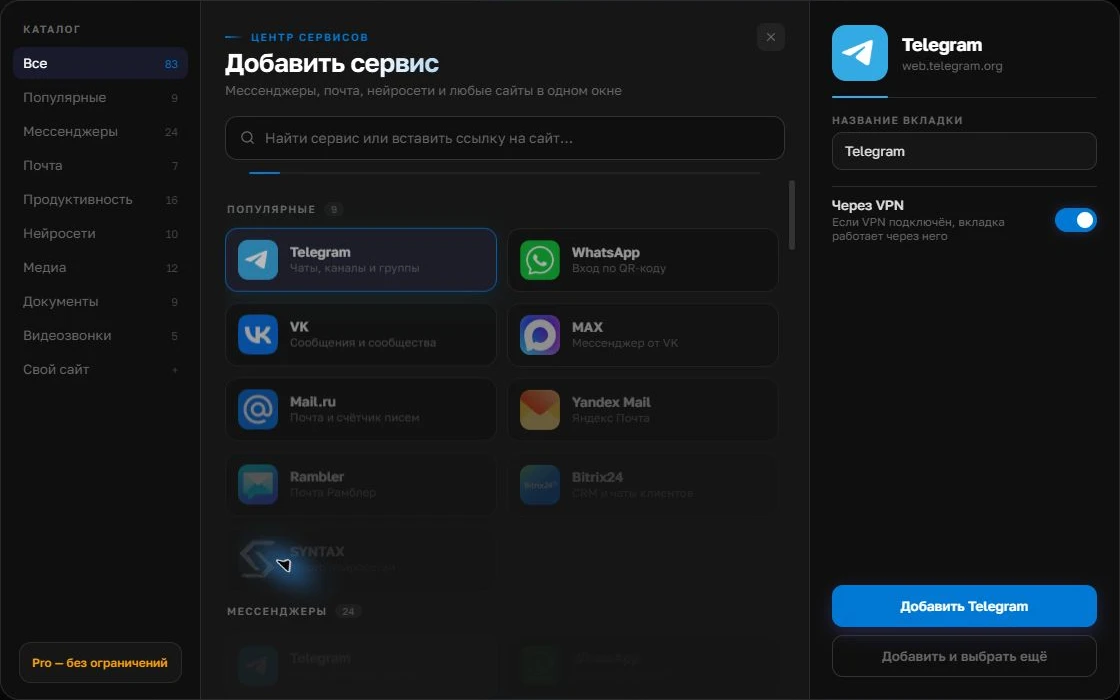
Give the account a clear name
On the right, choose a name you will recognize, such as “Work” or a project name. Add the service, then sign in through its usual website.
Open full-size screenshot ↗For a second account, add the service again. Sign in separately and verify the number or profile before your first reply. Adjust notifications to suit your work.
Build your own workspaceSet up your working tools
Choose one customer messenger, email and a knowledge base. Catalog services can be added to Centrio Free up to the three-service limit; a custom web address and a larger selection require Pro. Name them by purpose, then check attachments, links and search in each service. Website features may differ from native apps.
Reply without losing context
Read the question, open the instructions and compose a reply in the original channel. If escalation is needed, preserve the context in the ticket: the symptom, checks already performed and when the customer should receive the next update. Pro split screen is convenient for viewing the chat and knowledge base together, but does not replace recording the outcome.
- Chat is for customer contact.
- The knowledge base provides a verified solution.
- The helpdesk tracks responsibility and history.
When you need a team platform
If several operators reply from a shared number, you need permissions, routing, templates, SLAs and reports. These are not personal aggregator functions. Centrio suits individual specialists as a way to keep authorized web services together. With corporate SSO and security requirements, have the client app approved by your administrator.
Frequently asked questions
Can I assign inquiries to operators in Centrio?
No. A shared queue and assignment require a specialized system.
Does split screen help?
Yes. Pro can place a chat and knowledge base side by side if both web services work correctly in the app.
Sources and verification
Prepared by the Centrio editorial team. Below are official service pages and Centrio documentation. Feature availability depends on the app version and operating system.