

Choose a source of truth
Choose an ATS, a restricted-access spreadsheet or an approved HR system to record vacancy status, consent and the next step. A messenger is useful for confirming times, but an individual chat history should not be the only record of decisions. After every conversation, record the business agreement in the system authorized by the employer.
See the setup in Centrio
Screenshots show Centrio 3.5.1 with its Russian interface. Service names and the placement of the main controls help you follow the same steps in your language.
Open the service catalog
Click “+” in the left sidebar. Search for your messenger or email service and select its card.
Open full-size screenshot ↗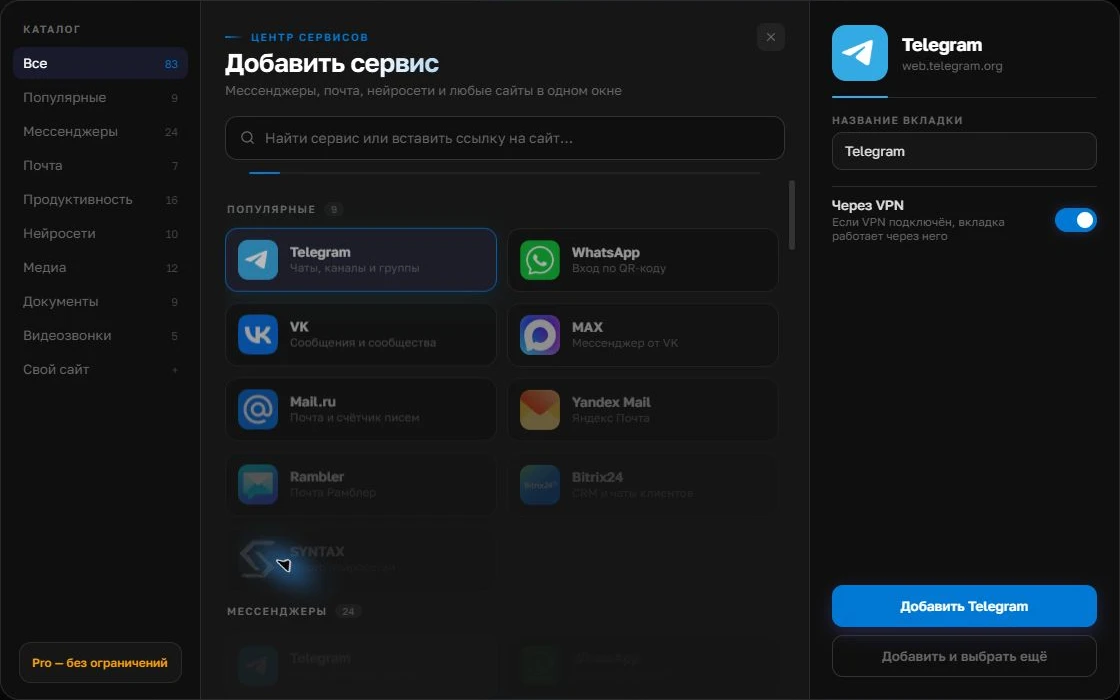
Give the account a clear name
On the right, choose a name you will recognize, such as “Work” or a project name. Add the service, then sign in through its usual website.
Open full-size screenshot ↗For a second account, add the service again. Sign in separately and verify the number or profile before your first reply. Adjust notifications to suit your work.
Build your own workspaceGroup channels by role
You can open the résumé inbox, Telegram for quick replies and the team’s Slack in Centrio as separate services. Free provides three catalog services. If a recruiter works on several projects, Pro folders help separate vacancies or clients; each additional account counts as a separate instance. The services’ sign-in requirements and corporate restrictions still apply.
Reduce the risk of mixing up candidates
Name accounts by company and role. Before sending a file, check the recipient and active service; similar avatars and identical names can be misleading. Do not store résumés in personal notes without a data retention policy. Test notifications in each channel to find out where replies go missing and whether the system’s quiet mode interferes.
- Status and consent belong in the HR system.
- Brief arrangements stay in the original channel.
- The next step is recorded where the team can see it.
When Centrio cannot replace an ATS
Candidate database search, pipeline stages, approvals and vacancy reports require an ATS. Centrio does not extract résumés from messages or automatically create candidate records. It is useful as a personal workspace for recruiters who need to reply in several familiar web services.
Frequently asked questions
Can Centrio maintain a candidate database?
No. Use an ATS or an employer-approved system for the database, stages and consents.
Can I separate different clients’ accounts?
Yes. Separate service instances have independent sessions. Folders and more than three services require Pro.
Sources and verification
Prepared by the Centrio editorial team. Below are official service pages and Centrio documentation. Feature availability depends on the app version and operating system.