

Distinguish an inquiry from a confirmed viewing
An initial WhatsApp or Telegram message is not yet a viewing appointment. Once the address and time are agreed, create a calendar event or CRM record, then confirm with the client in the original channel. This reduces the risk of a verbal agreement getting lost among new messages. Do not post client documents in group chats unnecessarily.
See the setup in Centrio
Screenshots show Centrio 3.5.1 with its Russian interface. Service names and the placement of the main controls help you follow the same steps in your language.
Open the service catalog
Click “+” in the left sidebar. Search for your messenger or email service and select its card.
Open full-size screenshot ↗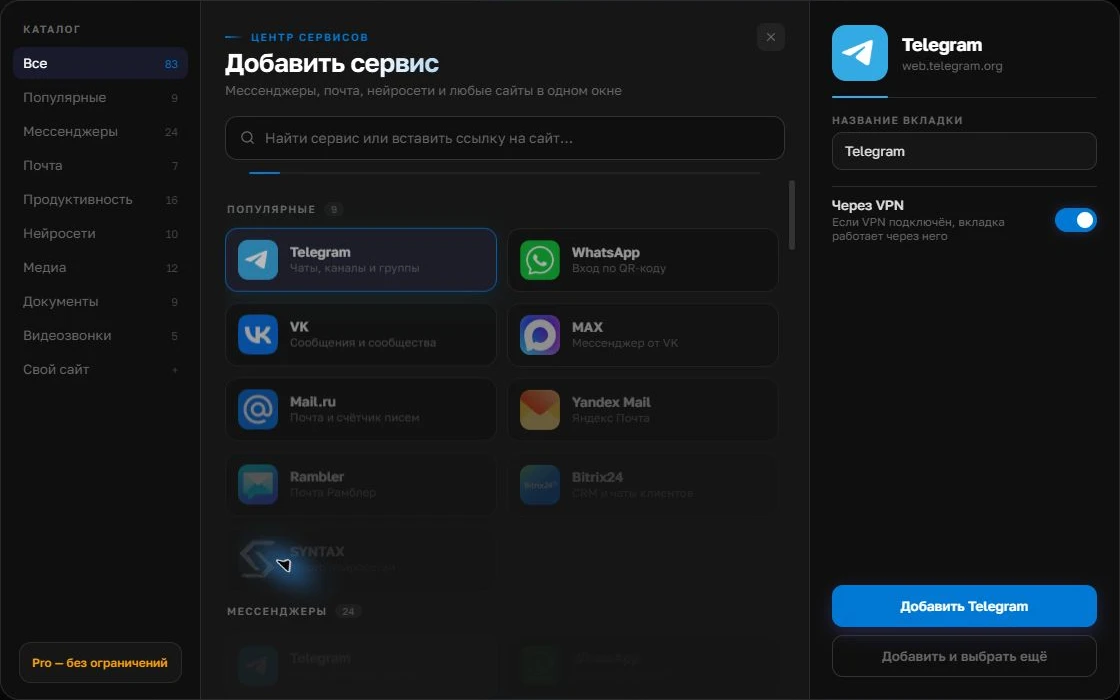
Give the account a clear name
On the right, choose a name you will recognize, such as “Work” or a project name. Add the service, then sign in through its usual website.
Open full-size screenshot ↗For a second account, add the service again. Sign in separately and verify the number or profile before your first reply. Adjust notifications to suit your work.
Build your own workspaceSet up your work window
Add your work WhatsApp, Telegram and email to Centrio. Three catalog services fit within Free; listing dashboards as custom websites and property folders require Pro, provided the web versions work correctly. Name instances by role rather than simply “WhatsApp 2”. For a second number, add a separate sign-in and check it through the standard linking procedure.
A short inquiry workflow
Open the message, clarify the property and requirements, record the agreement in the CRM or calendar and send confirmation. If a client writes from another messenger, do not rely on memory: match the contact using permitted data and record the communication channel in the client record. Centrio does not automatically merge two chats belonging to the same person.
- Reply in the original channel.
- Record the time and property.
- Confirm with the client and check the notification.
The limits of a shared window
If an agency assigns leads to several agents, it needs a CRM pipeline, handoff rules and access control. Centrio does not assign inquiries. It helps an individual agent see their own channels together without opening four apps and ten browser tabs.
Frequently asked questions
Will Centrio combine one client’s inquiries from WhatsApp and Telegram?
No. Matching contacts and maintaining the client record are tasks for the CRM or the agent.
Is Free enough for an individual agent?
Yes, for three catalog services. Folders, custom websites and more services are available in Pro.
Sources and verification
Prepared by the Centrio editorial team. Below are official service pages and Centrio documentation. Feature availability depends on the app version and operating system.