

Separate sources by the action they require
An order problem and a colleague’s Telegram message require different actions. List your three everyday sources: the seller dashboard, notification emails and the work chat. Set an expected checking interval for each. This helps you stop treating every notification alike and looking for an order in a messenger that does not hold its status.
See the setup in Centrio
Screenshots show Centrio 3.5.1 with its Russian interface. Service names and the placement of the main controls help you follow the same steps in your language.
Open the service catalog
Click “+” in the left sidebar. Search for your messenger or email service and select its card.
Open full-size screenshot ↗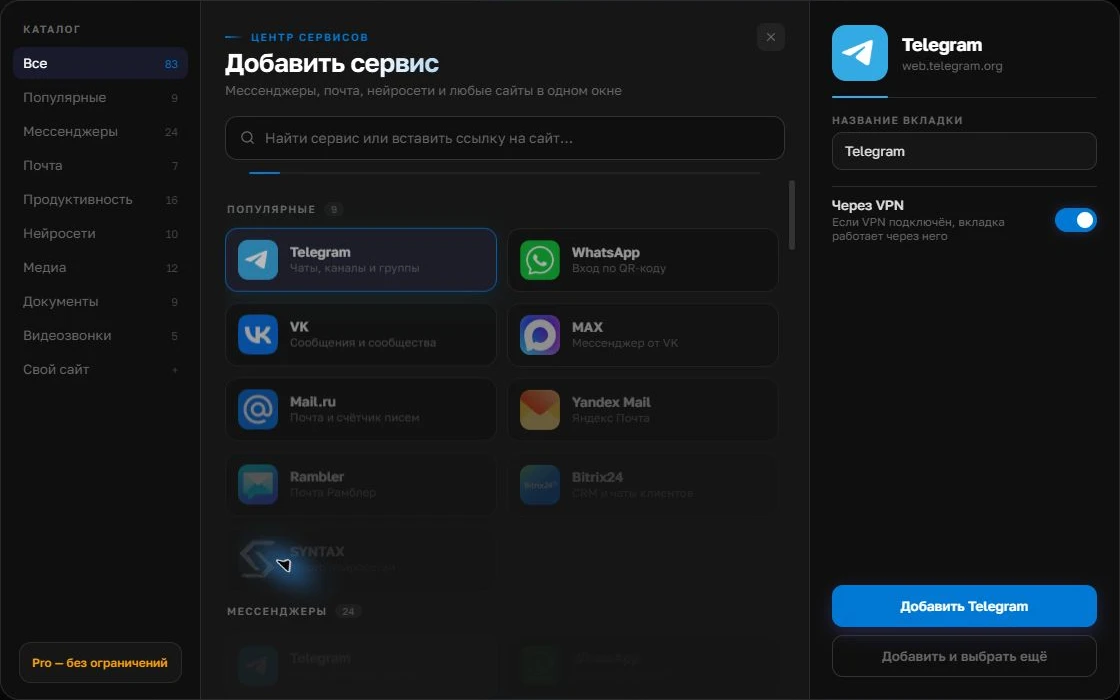
Give the account a clear name
On the right, choose a name you will recognize, such as “Work” or a project name. Add the service, then sign in through its usual website.
Open full-size screenshot ↗For a second account, add the service again. Sign in separately and verify the number or profile before your first reply. Adjust notifications to suit your work.
Build your own workspaceBuild your personal workspace
In Centrio, add Telegram and email from the catalog. If the marketplace dashboard is available as a website and opens in your version of the app, adding a custom address requires Pro. First check sign-in, key sections and file loading. Do not assume every dashboard action works exactly as it does in a supported browser.
- Name services by marketplace and role.
- Keep the urgent work chat separate from personal conversations.
- Check order statuses in the official dashboard.
Set up a short checking routine
Start with orders and inquiries that have a response deadline, then check email and the team chat. Finally, record the outcome in the system the team uses to handle that order. A note in Centrio Pro is handy as a personal to-do list, but does not replace the order record or employees’ shared work in the marketplace system.
When you need a specialized service
If you run several stores, your team works shifts and you need a shared inquiry queue, a personal workspace cannot handle assignment. Compare the marketplaces’ official tools and support services with the necessary integrations. Centrio is useful for sellers who personally manage several web sources and want less switching.
Frequently asked questions
Does Centrio automatically collect Ozon and Wildberries orders?
No. The app displays web services in separate sessions; orders and their statuses remain in the official seller dashboards.
Can I add a seller dashboard as a custom website?
Pro lets you add a web address. Test the compatibility of your particular dashboard in practice.
Sources and verification
Prepared by the Centrio editorial team. Below are official service pages and Centrio documentation. Feature availability depends on the app version and operating system.