

Separate channels by client
List where each client sends urgent messages, stores files and officially records decisions. Do not make your personal messenger the project’s only archive. If a client requires SSO, a managed browser or specific data storage arrangements, agree on the use of a new app before signing in.
See the setup in Centrio
Screenshots show Centrio 3.5.1 with its Russian interface. Service names and the placement of the main controls help you follow the same steps in your language.
Open the service catalog
Click “+” in the left sidebar. Search for your messenger or email service and select its card.
Open full-size screenshot ↗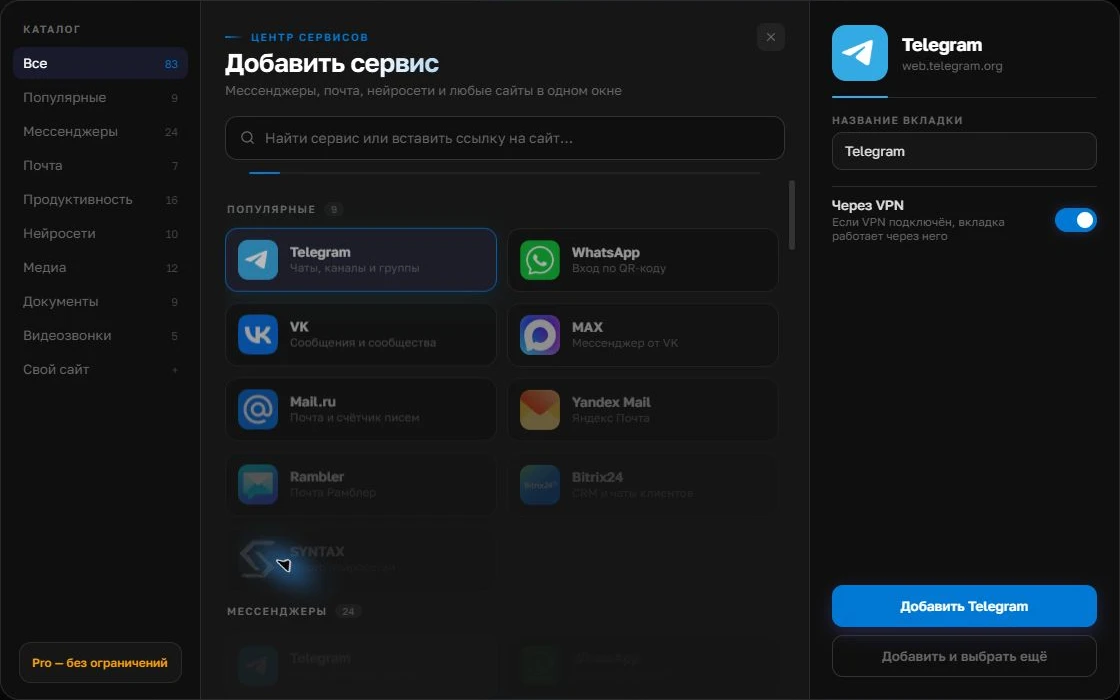
Give the account a clear name
On the right, choose a name you will recognize, such as “Work” or a project name. Add the service, then sign in through its usual website.
Open full-size screenshot ↗For a second account, add the service again. Sign in separately and verify the number or profile before your first reply. Adjust notifications to suit your work.
Build your own workspaceCreate clearly named service instances
In Centrio, add work Telegram, WhatsApp, Slack or email accounts as separate services and name each after the client. An additional account for the same service takes up a separate slot. Free is sufficient for three catalog services; client folders and a larger selection are available in Pro. Sign in to each instance normally, without copying anyone else’s sessions.
Check the context before replying
Before sending a file, check the active account, recipient and project. After a discussion, record the agreed outcome where the client’s team can find it: in a task, document or email. Keep sound enabled only for channels with an agreed quick response time, and check the others on a schedule.
- Open the client’s folder.
- Check the sender and recipient.
- Reply and record the next step.
When you need a project management system
Centrio does not assign tasks to consultants, manage budgets or create a shared archive across all clients. Use the agreed project tools for that. An aggregator is useful as an individual specialist’s workspace when they need to avoid missing incoming messages across different web services.
Frequently asked questions
Can I open Slack for two different clients?
Yes. If web sign-in is permitted, add them as two independent instances and check that the correct workspace is active.
Do folders synchronize client conversations?
No. Folders organize services on screen; the data stays on the original platforms.
Sources and verification
Prepared by the Centrio editorial team. Below are official service pages and Centrio documentation. Feature availability depends on the app version and operating system.