

Agree on access boundaries first
For every client, list the permitted accounts, channels and responsible employees. A shared password in a chat and sign-in using a contractor’s personal number create problems when the team changes. Use invitations, roles and SSO wherever the service provides them. Centrio does not grant access rights; it only maintains separate sign-ins to authorized web services.
See the setup in Centrio
Screenshots show Centrio 3.5.1 with its Russian interface. Service names and the placement of the main controls help you follow the same steps in your language.
Open the service catalog
Click “+” in the left sidebar. Search for your messenger or email service and select its card.
Open full-size screenshot ↗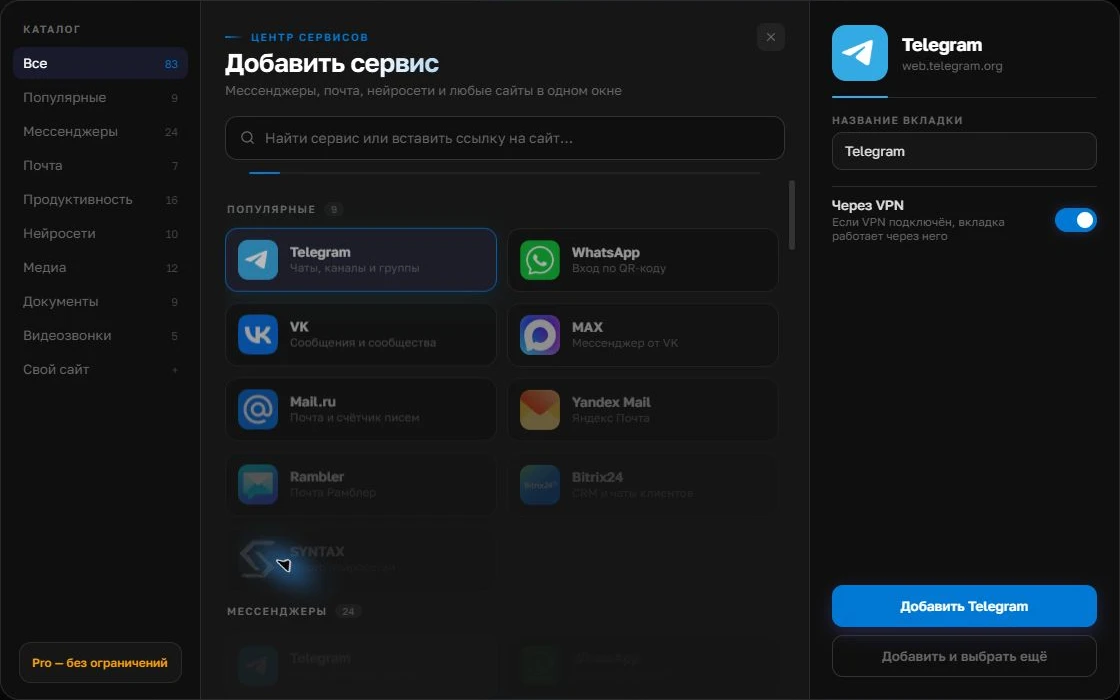
Give the account a clear name
On the right, choose a name you will recognize, such as “Work” or a project name. Add the service, then sign in through its usual website.
Open full-size screenshot ↗For a second account, add the service again. Sign in separately and verify the number or profile before your first reply. Adjust notifications to suit your work.
Build your own workspaceBuild a client-based structure
Add separate instances of Slack, Gmail, Telegram and other necessary channels, naming them after the project. In Centrio Pro, organize them in folders such as “Client A”, “Client B” and “Internal”. Each additional sign-in counts as a separate service; Free is limited to three. Do not expect a shared search across accounts: content stays on its own platforms.
Test switching between projects
Switch from one client to another and send a harmless test message to an agreed channel. Check the avatar, email domain and workspace name before replying. Configure notifications according to client deadlines rather than the default volume. Do not mute a channel that requires a fast response under your agreement.
- Open the project folder.
- Check the active account.
- Reply and record the next step in the project system.
What a personal window does not replace
Approvals, tasks, budgets and work history require project management systems. Centrio does not monitor SLAs or transfer data between client accounts. It is useful as the interface for an agency employee using several authorized web services at once.
Frequently asked questions
Can I keep two different clients’ Gmail accounts open?
Yes. Add two separate instances and sign in to each with the appropriate account.
Can other employees see my Centrio folders?
Folders organize your workspace. Shared project access is managed by the services themselves and the agency’s work systems.
Sources and verification
Prepared by the Centrio editorial team. Below are official service pages and Centrio documentation. Feature availability depends on the app version and operating system.