

Classify channels by urgency
A report of a community rule violation and a comment on a post do not require the same response speed. Record where reports arrive, where ordinary questions are asked and where announcements are published. Assign a backup for when the manager is away. Without that preparation, even a perfect notification panel cannot prevent missed messages.
See the setup in Centrio
Screenshots show Centrio 3.5.1 with its Russian interface. Service names and the placement of the main controls help you follow the same steps in your language.
Open the service catalog
Click “+” in the left sidebar. Search for your messenger or email service and select its card.
Open full-size screenshot ↗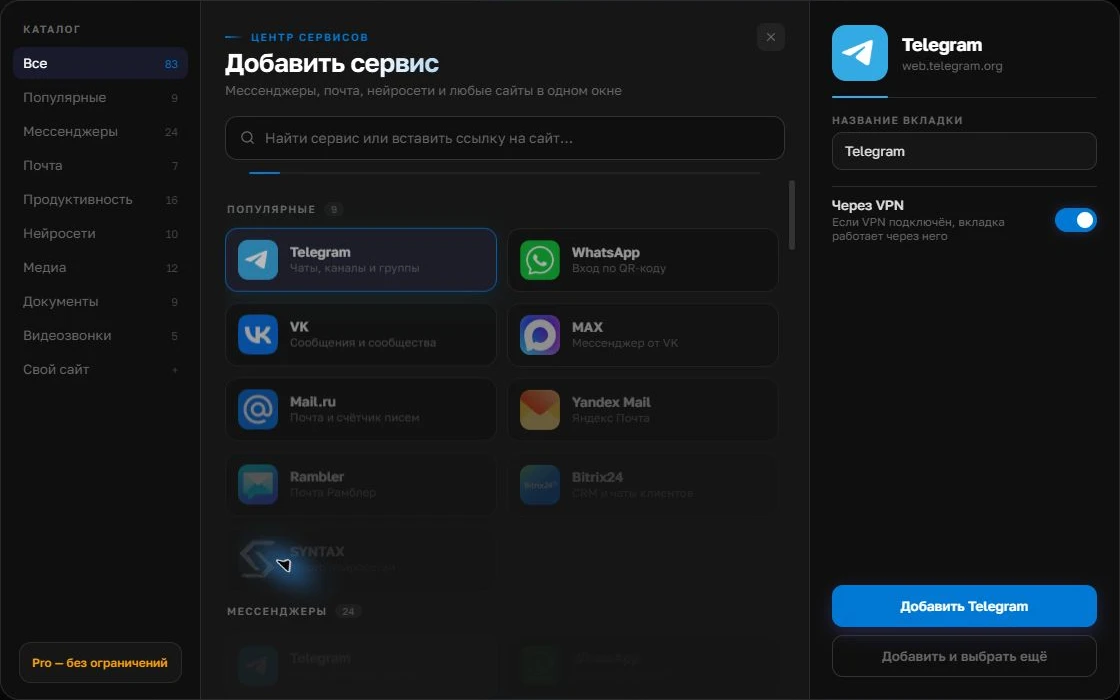
Give the account a clear name
On the right, choose a name you will recognize, such as “Work” or a project name. Add the service, then sign in through its usual website.
Open full-size screenshot ↗For a second account, add the service again. Sign in separately and verify the number or profile before your first reply. Adjust notifications to suit your work.
Build your own workspaceBring your channels into Centrio
Add Discord, Telegram and VK, sign in with accounts that have the necessary permissions and name each service after the community. Three catalog services are included in Free. Use Pro for several brands and project folders. Before starting work, check that the required web sections are available: moderation and media features do not always match the native apps.
Run a coverage test
Send a test mention and message to each channel. Check that the notification appears and opens the right account. Keep sound for moderation incidents, and process reports and routine discussions in batches. If the same question arrives on two platforms, record the answer in the team’s system so a colleague does not give a different version.
- Urgent items get an audible notification.
- Routine items get a scheduled check.
- Incident decisions are recorded for the team.
When you need dedicated moderation tools
A large community needs a report queue, an action log, automated rules and analytics. Centrio does not replace bots, a helpdesk or the platforms’ own moderation tools. Its purpose is to give one manager an overview of several authorized web services in a single workspace.
Frequently asked questions
Can I reply on behalf of two different brands?
Yes, provided you have the appropriate accounts and permissions. Separate instances and folders help keep brands distinct.
Will there be one shared complaint queue?
No. That requires moderation tools or a helpdesk with suitable integrations.
Sources and verification
Prepared by the Centrio editorial team. Below are official service pages and Centrio documentation. Feature availability depends on the app version and operating system.