
Give each platform a clear purpose
Decide where members should ask questions, where news is published and where complaints are received. If the same message arrives through two channels, set a response rule to avoid conflicting promises. A separate workspace app does not replace this structure, but helps you follow it by keeping both platforms close at hand.
See the setup in Centrio
Screenshots show Centrio 3.5.1 with its Russian interface. Service names and the placement of the main controls help you follow the same steps in your language.

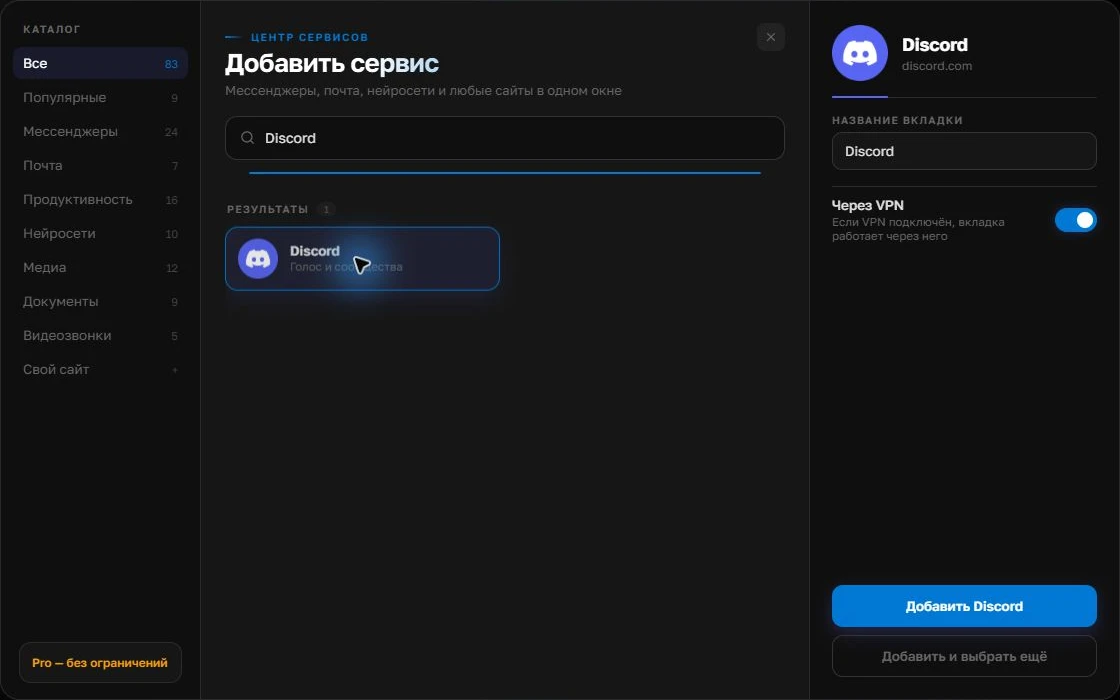
Open the service catalog
Click “+” in the left sidebar. Search for your messenger or email service and select its card.
Open full-size screenshot ↗Give the account a clear name
On the right, choose a name you will recognize, such as “Work” or a project name. Add the service, then sign in through its usual website.
Open full-size screenshot ↗For a second account, add the service again. Sign in separately and verify the number or profile before your first reply. Adjust notifications to suit your work.
Build your own workspaceAdd both web versions
Connect Discord and Telegram in Centrio, sign into your accounts and name the services by purpose. Two services fit in Free. Community email can take the third slot; a larger setup requires Pro. Test Discord voice and media features separately: the web version’s capabilities may differ from the native client.
Set up your moderation shift
Enable noticeable notifications for mentions and complaints, and mute less urgent channels. Send a test incoming message in both services and follow the path from notification to reply. If there are several moderators, record who handles each platform: otherwise two people may give contradictory decisions, and Centrio does not assign enquiries automatically.
- Check a Discord mention.
- Check a Telegram direct message.
- Confirm who is responsible for each channel.
When you need a bot or helpdesk
A large community may need a bot, ticket system or specialist moderation tools. These help with queues, rules and a record of team actions. Centrio serves another purpose: a moderator’s personal window with several familiar interfaces. Do not promise members that Discord messages will automatically appear in Telegram.
Frequently asked questions
Will Centrio merge Discord and Telegram conversation lists?
No. The app contains two separate web versions.
Do I need Pro for two channels?
No. Two catalogue services fit in Free. Pro is needed for advanced organisation and more services.
Sources and verification
Prepared by the Centrio editorial team. Below are official service pages and Centrio documentation. Feature availability depends on the app version and operating system.