

Record your starting setup
Choose two or three services you use daily, such as Telegram, WhatsApp and email. Record how often you lose a tab, miss a notification or sign in to the wrong account. If none of these problems occurs, a separate app may offer little noticeable benefit. If work chats constantly get mixed up with research and documents, continue the comparison.
See the setup in Centrio
Screenshots show Centrio 3.5.1 with its Russian interface. Service names and the placement of the main controls help you follow the same steps in your language.
Open the service catalog
Click “+” in the left sidebar. Search for your messenger or email service and select its card.
Open full-size screenshot ↗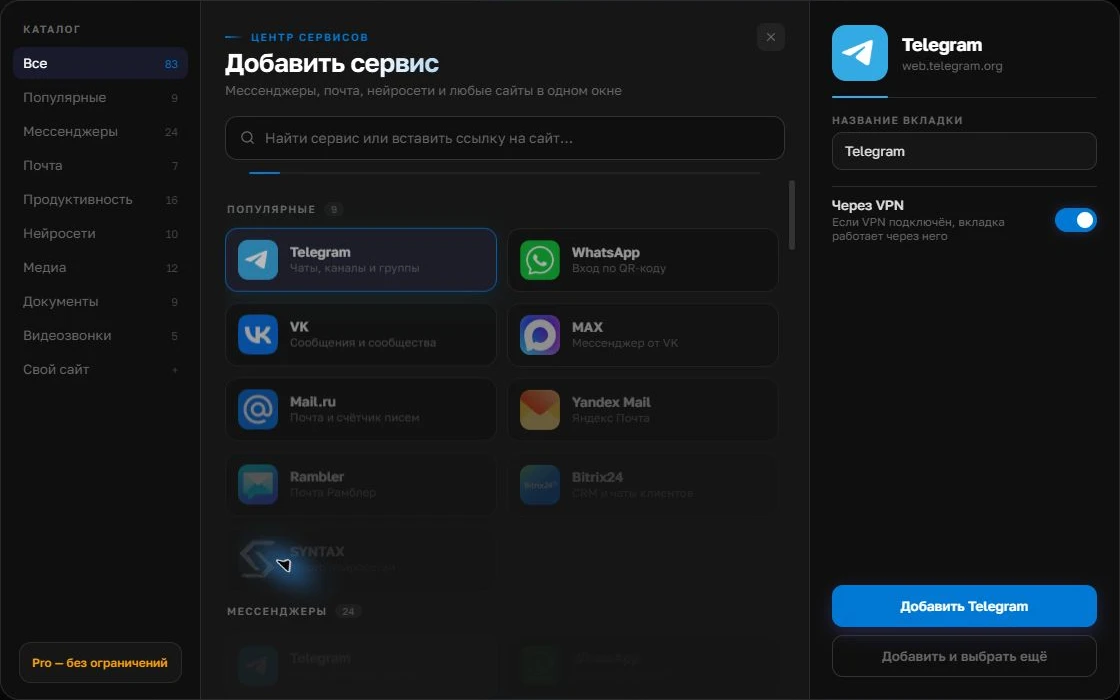
Give the account a clear name
On the right, choose a name you will recognize, such as “Work” or a project name. Add the service, then sign in through its usual website.
Open full-size screenshot ↗For a second account, add the service again. Sign in separately and verify the number or profile before your first reply. Adjust notifications to suit your work.
Build your own workspaceRecreate the same setup in Centrio
Add the same three catalog services on Free, sign in to the same accounts and check notifications. Avoid adding ten new websites at the same time, as that would make the conditions incomparable. Try your usual actions—a reply, a file, a link and a chat search—and note how long switching between them takes.
How to compare performance
Compare the same set of open web services after a similar running time. Check memory, CPU use and perceived responsiveness, but do not expect a messenger’s web version to stop using resources just because it runs in a separate wrapper. A browser slowed by extensions or hundreds of unrelated tabs introduces a separate factor.
Decide from results, not slogans
Keep Centrio if the dedicated panel reduced switching without breaking essential actions. Keep your browser if corporate sign-in and specialist features work better there. You can use both: a browser for research and Centrio for daily communication. Consider Pro only after the basic setup has proved useful.
Frequently asked questions
Is Centrio faster than a browser?
That cannot be guaranteed for every system and set of sites. Test the same services for the same running time on your computer.
Do I have to pay to run this test?
No. You can test up to three catalog services on Free.
Sources and verification
Prepared by the Centrio editorial team. Below are official service pages and Centrio documentation. Feature availability depends on the app version and operating system.