

For one specialist
If each channel belongs to a particular person, Centrio brings that person’s web services into one window. They can move quickly between chats, email and a knowledge base while keeping familiar interfaces. Messages remain in their original services, though: an aggregator does not create a ticket or show customer history across platforms.
See the setup in Centrio
Screenshots show Centrio 3.5.1 with its Russian interface. Service names and the placement of the main controls help you follow the same steps in your language.
Open the service catalog
Click “+” in the left sidebar. Search for your messenger or email service and select its card.
Open full-size screenshot ↗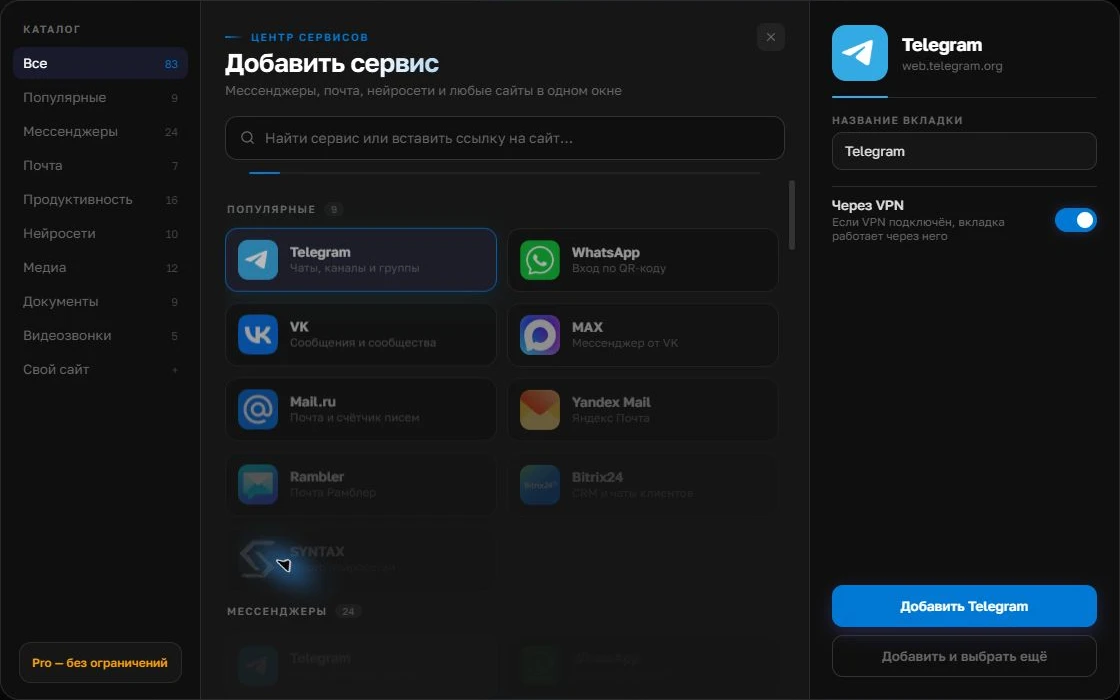
Give the account a clear name
On the right, choose a name you will recognize, such as “Work” or a project name. Add the service, then sign in through its usual website.
Open full-size screenshot ↗For a second account, add the service again. Sign in separately and verify the number or profile before your first reply. Adjust notifications to suit your work.
Build your own workspaceFor a team working in shifts
A helpdesk is needed when several agents handle one stream and require request assignment, pending statuses, SLAs, templates and an action log. Separate tabs on one employee’s computer do not tell you who should reply to the customer after a shift change. Check the platform’s official integrations with your channels and its data storage terms.
Where the choice changes
Count the people responsible for your messengers, as well as the messengers themselves. With one employee, start by organizing their workspace. If two agents share a number, establish how conversations will be handed over; you will usually need a support system. Centrio can remain an employee’s personal panel after a helpdesk is introduced.
| Scenario | First step |
|---|---|
| One person with three services of their own | Centrio Free |
| One person with many projects | Centrio Pro and rules for recording work |
| Several agents sharing one channel | A helpdesk with a suitable integration |
A realistic test before paying
Take a realistic test request through its full journey: an incoming message, a reply, a handover to another person and finding the history a week later. Run through it in your chosen product. If handover and history searches require manual copying, an aggregator alone is insufficient. If you do not need a queue, a complex helpdesk may simply slow you down.
Frequently asked questions
Does Centrio have a shared request queue?
No. It is a personal app for working with separate web services.
Can Centrio work alongside a helpdesk?
Yes. If the helpdesk is available as a compatible website, Pro lets you add it as a custom service.
Sources and verification
Prepared by the Centrio editorial team. Below are official service pages and Centrio documentation. Feature availability depends on the app version and operating system.