

What an aggregator provides
Centrio places the web versions of Telegram, WhatsApp, MAX, email and other services in one window. It helps an individual employee find the right channel faster and keep work and personal sign-ins separate. Each service retains its own conversation list. There is no automatic shared customer record, deal stage or lead assignment across salespeople.
See the setup in Centrio
Screenshots show Centrio 3.5.1 with its Russian interface. Service names and the placement of the main controls help you follow the same steps in your language.
Open the service catalog
Click “+” in the left sidebar. Search for your messenger or email service and select its card.
Open full-size screenshot ↗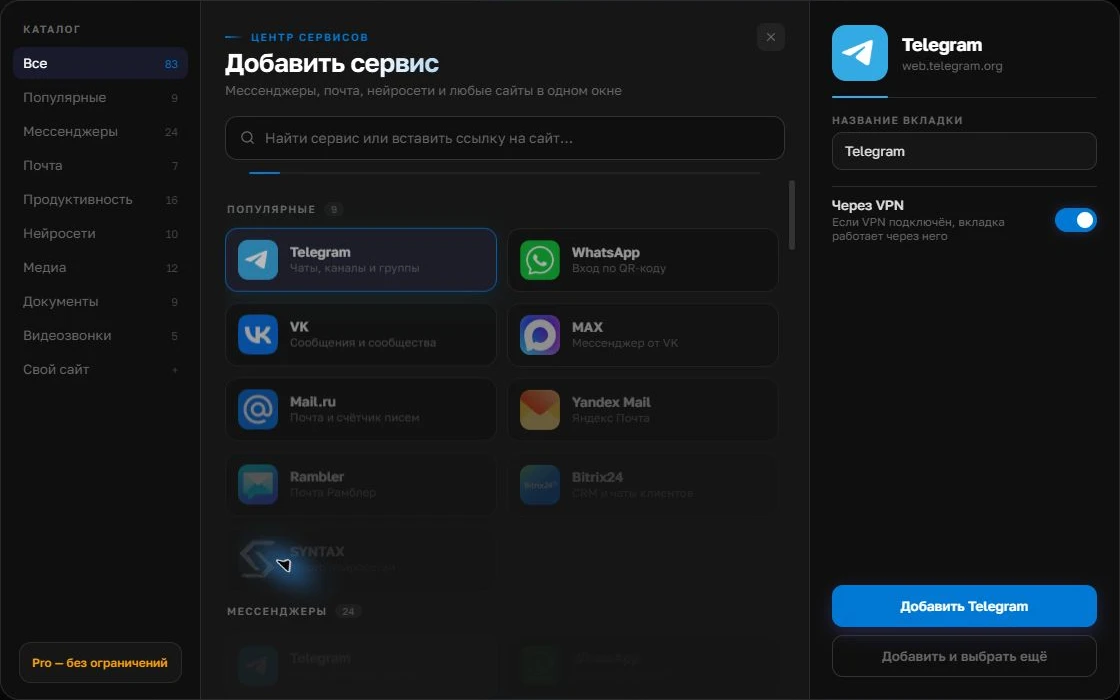
Give the account a clear name
On the right, choose a name you will recognize, such as “Work” or a project name. Add the service, then sign in through its usual website.
Open full-size screenshot ↗For a second account, add the service again. Sign in separately and verify the number or profile before your first reply. Adjust notifications to suit your work.
Build your own workspaceWhat a CRM should do
A CRM stores customer records, deal stages, tasks, owners and the history of actions on a deal. Some CRMs connect messengers through integrations, but capabilities and costs depend on the product and channel. If another salesperson needs to take over the same customer, a CRM or another shared register becomes the foundation of the process.
| Task | Tool needed |
|---|---|
| Several of your own channels on one screen | Aggregator |
| Customer records and a sales pipeline | CRM |
| A shared incoming queue | CRM with an integration or a helpdesk |
Using both without duplicating work
Reply in the original channel, then record your commitment and next step in the CRM. If the CRM has a web version, you can try adding it beside your messengers as a custom website in Centrio Pro. Test sign-in, attachments and critical actions on a test deal. Sharing a screen does not automatically synchronize data.
Making the decision
For solo work across two or three channels, start with Centrio Free. When your customer process requires lead handovers, stages and reporting, choose a CRM and check its official integrations. Avoid buying an expensive omnichannel system just to switch windows conveniently, but do not run a team’s sales process through one salesperson’s personal sessions either.
Frequently asked questions
Can Centrio replace a CRM?
No. Centrio does not manage customer records or a sales pipeline.
Can I open a CRM in Centrio?
Pro lets you add a compatible website by its address; test the CRM’s key features separately.
Sources and verification
Prepared by the Centrio editorial team. Below are official service pages and Centrio documentation. Feature availability depends on the app version and operating system.