

One record for each deal stage
After a request for pricing, a meeting or an invoice, record the outcome in the CRM: which product interests the client, what was promised and when the next contact is due. WhatsApp or Telegram history remains useful context, but colleagues should not have to search a salesperson’s personal account for it. If your company has lead handoff rules, follow them before connecting a new tool.
See the setup in Centrio
Screenshots show Centrio 3.5.1 with its Russian interface. Service names and the placement of the main controls help you follow the same steps in your language.
Open the service catalog
Click “+” in the left sidebar. Search for your messenger or email service and select its card.
Open full-size screenshot ↗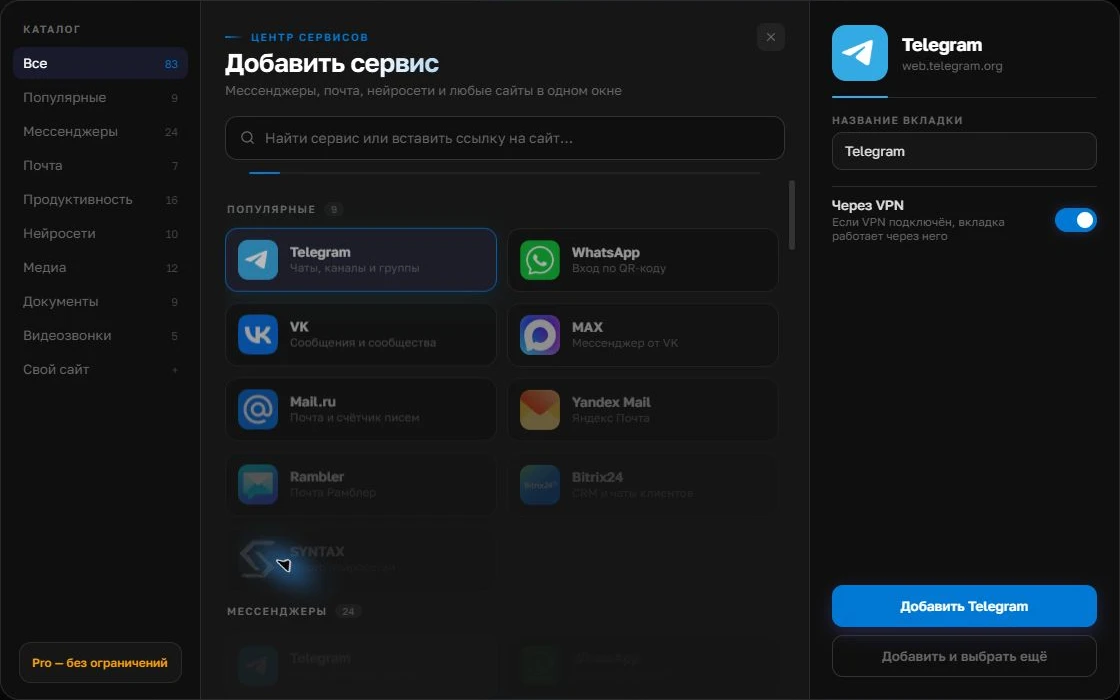
Give the account a clear name
On the right, choose a name you will recognize, such as “Work” or a project name. Add the service, then sign in through its usual website.
Open full-size screenshot ↗For a second account, add the service again. Sign in separately and verify the number or profile before your first reply. Adjust notifications to suit your work.
Build your own workspaceBring together only the channels you need
Start with two or three services that actually bring inquiries. Add them to Centrio, sign in normally, name them by role and send test messages. You can try opening a CRM by address as a custom website in Centrio Pro, but individual CRM features need practical testing. Free supports three catalog services.
Make your reply workflow repeatable
Read the inquiry in its original channel, check the client and active number, reply, then create a CRM task. If the client writes from another channel, match the contact in the CRM rather than assuming two identical names mean the same person. Centrio does not merge identities or deduplicate contacts.
- Check the sender and product.
- Reply in the original channel.
- Record the outcome and next step in the CRM.
When the team needs more
A department with several salespeople and a shared number needs lead assignment, SLAs, templates, analytics and permissions. These are CRM and omnichannel platform functions. Centrio helps one employee use their own web services in one window and does not replace team message routing.
Frequently asked questions
Will Centrio create deals from chats?
No. Deals, tasks and lead ownership remain in the CRM.
Can I open the CRM alongside a messenger?
If the CRM has a compatible web version, Pro lets you add it as a custom website; check its key functions before switching.
Sources and verification
Prepared by the Centrio editorial team. Below are official service pages and Centrio documentation. Feature availability depends on the app version and operating system.