
Keep the conversation where the transaction began
If a buyer contacted you through a listing, reply in the platform’s official chat. Moving unnecessarily to another channel can deprive both sides of context and platform tools. Use Telegram for partner communication and email for documents and formal confirmations. This keeps a question about a specific item from becoming three disconnected conversations.
See the setup in Centrio
Screenshots show Centrio 3.5.1 with its Russian interface. Service names and the placement of the main controls help you follow the same steps in your language.

Open the service catalog
Click “+” in the left sidebar. Search for your messenger or email service and select its card.
Open full-size screenshot ↗Add your own website by URL
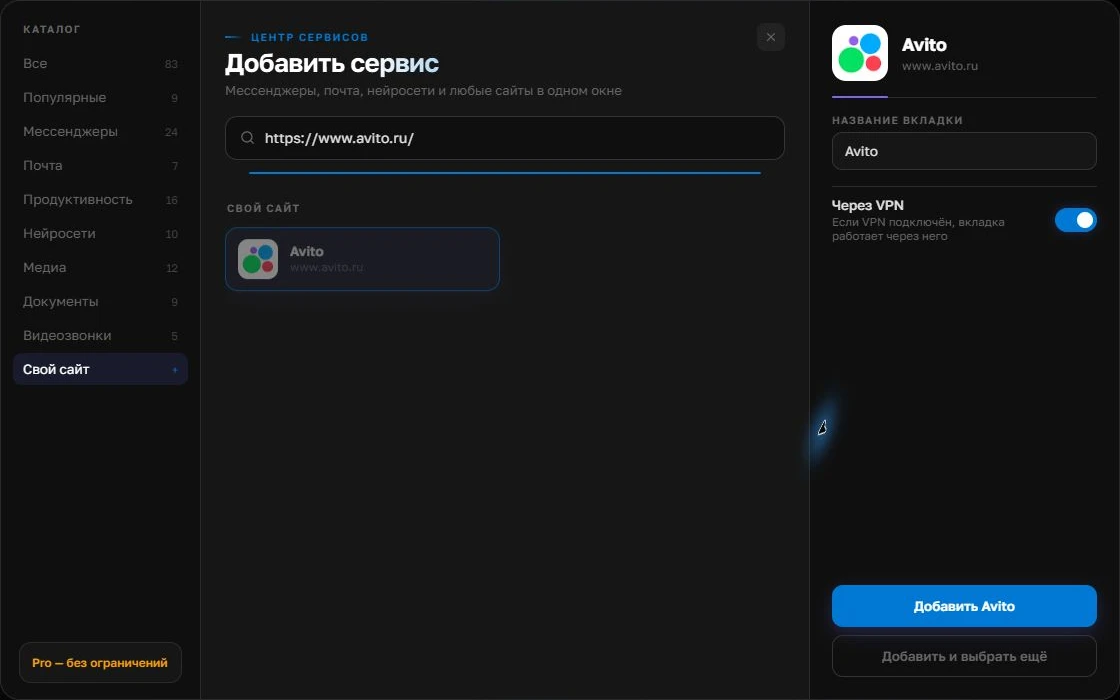
Choose the custom website category, paste the full URL, select the matching card and verify the address on the right before adding it.
Open full-size screenshot ↗For a second account, add the service again. Sign in separately and verify the number or profile before your first reply. Adjust notifications to suit your work.
Build your own workspaceSet up the seller’s window
Open the official Avito web dashboard in a supported browser. If it works correctly as a custom website in Centrio Pro, add it alongside Telegram and email. Custom URLs require Pro; check sign-in, listing images, attachments and notifications before switching fully. You can start with Centrio Free for catalog services alone and keep Avito in your browser.
Check incoming messages without constant noise
Schedule intervals for checking Avito messages and keep a separate urgent channel for ongoing transactions. A test message from a trusted account will show whether notifications arrive in your chosen setup. If they do not, do not rely solely on the background panel: keep checking the dashboard regularly and investigate the cause.
- Open the relevant listing and conversation.
- Check that attachments load.
- Send a test message and check the notification.
Teams need a different level of access management
Several employees using one account need access rules and conversation assignment. Centrio separates personal sessions and helps one operator keep channels together, but does not assign buyers to managers or create CRM records. Do not replace the platform’s role management with sharing a common account password.
Frequently asked questions
Is Avito already in the Centrio catalog?
Availability depends on the current catalog. If necessary, Pro lets you try adding the official web address as a custom service.
Will Avito chats move to Telegram?
No. Conversations remain in the Avito dashboard; Centrio organizes windows rather than transferring messages.
Sources and verification
Prepared by the Centrio editorial team. Below are official service pages and Centrio documentation. Feature availability depends on the app version and operating system.