
When WhatsApp Web is enough
If you reply occasionally and do almost everything else in a browser, the official web.whatsapp.com may be the simplest option. Sign in through linked devices and pin the tab. Use separate browser profiles for two numbers. Wait until you identify a problem an extra app should solve before installing it.
See the setup in Centrio
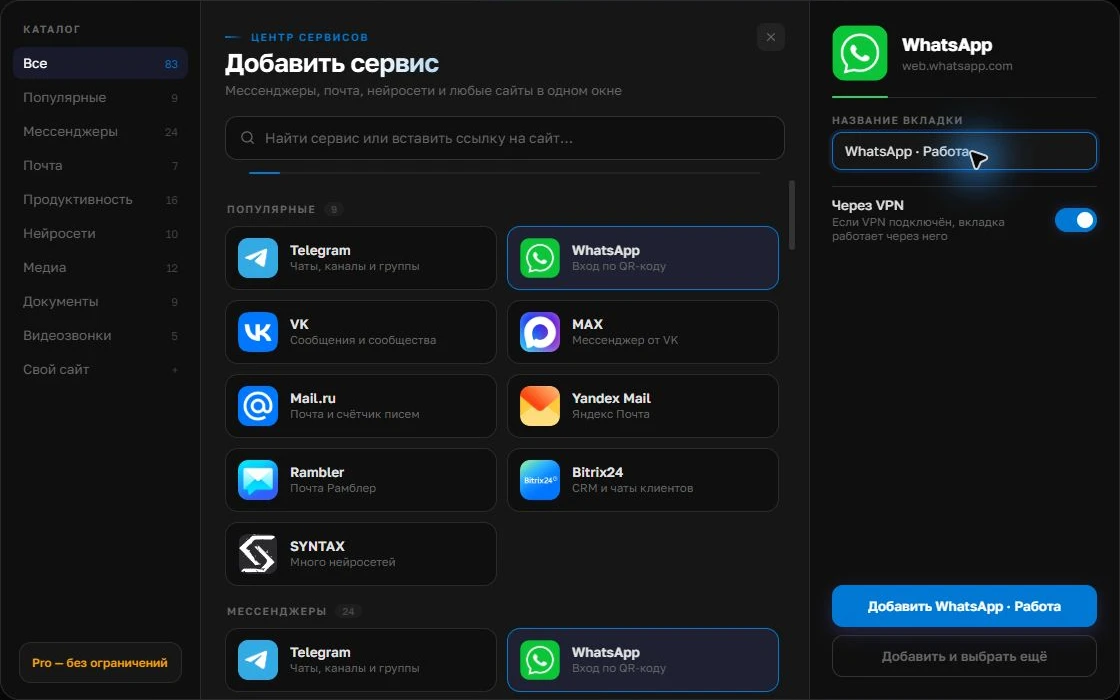
Screenshots show Centrio 3.5.1 with its Russian interface. Service names and the placement of the main controls help you follow the same steps in your language.

Open the service catalog
Click “+” in the left sidebar. Search for your messenger or email service and select its card.
Open full-size screenshot ↗Give the account a clear name
On the right, choose a name you will recognize, such as “Work” or a project name. Add the service, then sign in through its usual website.
Open full-size screenshot ↗For a second account, add the service again. Sign in separately and verify the number or profile before your first reply. Adjust notifications to suit your work.
Build your own workspaceWhat the official desktop client offers
Try WhatsApp’s native app if you need capabilities unavailable in your web client, such as calls, device handling or particular notification behavior. Availability depends on the version and operating system, so compare on your own computer. The official client often makes sense when WhatsApp is your only work messenger.
When Centrio helps
If you constantly need Telegram, MAX, Slack and email alongside WhatsApp, Centrio brings their web versions into one window. WhatsApp remains a normal web session with standard device linking; two numbers can run as separate instances. Free allows three catalog services, while more services and folders require Pro. Test attachments, links and notifications before leaving your previous setup.
A quick selection test
Take three actions: reply to a customer, send a file and receive or start a call if needed. Try them in each option. Then add your other daily services and see how often you switch windows. Centrio does not give WhatsApp Web every feature of the native client or create a unified inbox.
| Your main priority | Try first |
|---|---|
| Occasional replies | WhatsApp Web |
| Specific client features | The official app |
| WhatsApp alongside many other channels | Centrio |
Frequently asked questions
Can I use WhatsApp Web without signing in on my phone?
Initial linking and linked-device management follow WhatsApp’s rules. Centrio does not bypass them.
Does Centrio support WhatsApp calls?
That depends on the web version’s capabilities and your environment. Test your specific workflow before switching.
Sources and verification
Prepared by the Centrio editorial team. Below are official service pages and Centrio documentation. Feature availability depends on the app version and operating system.