

Identify the problem you have now
If you spend all day researching websites and documents, browser tab organization may be the issue. If dozens of tabs are open only for Telegram, WhatsApp, Slack and email, a separate communication window can remove them from the main tab strip. Count actual switches and missed notifications, as well as open websites.
See the setup in Centrio
Screenshots show Centrio 3.5.1 with its Russian interface. Service names and the placement of the main controls help you follow the same steps in your language.
Open the service catalog
Click “+” in the left sidebar. Search for your messenger or email service and select its card.
Open full-size screenshot ↗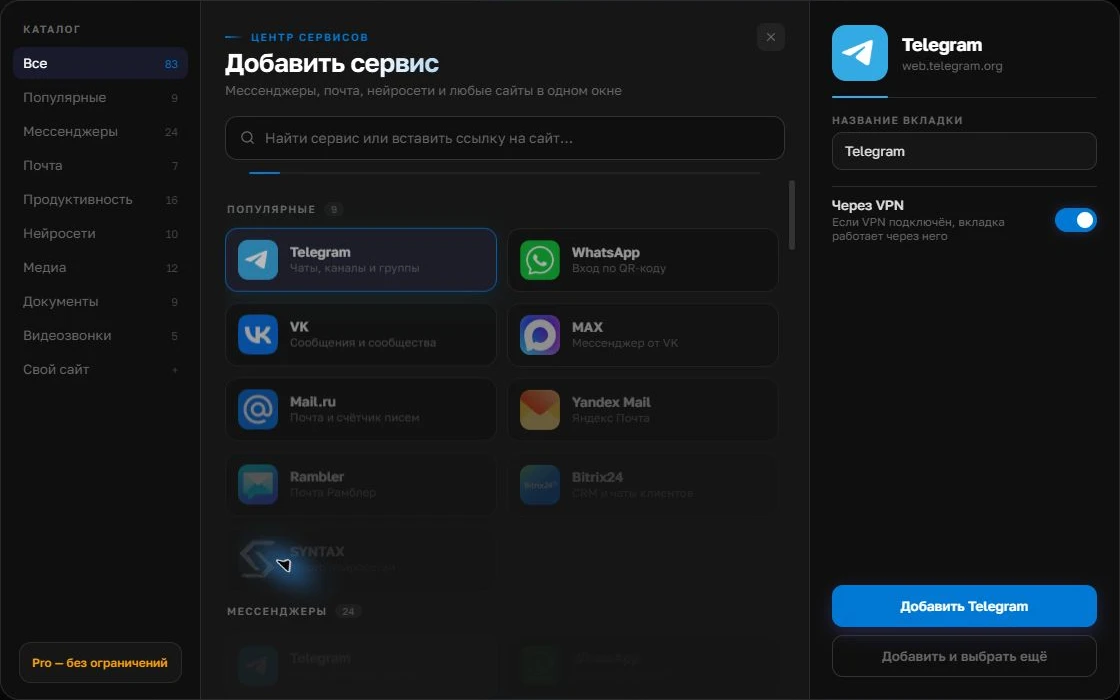
Give the account a clear name
On the right, choose a name you will recognize, such as “Work” or a project name. Add the service, then sign in through its usual website.
Open full-size screenshot ↗For a second account, add the service again. Sign in separately and verify the number or profile before your first reply. Adjust notifications to suit your work.
Build your own workspaceCheck accounts and catalogs
List the web services and accounts that need to stay signed in. In Centrio, each service instance has its own session; Free includes three catalog services, while custom addresses require Pro. A browser-based approach may offer its own profiles and groups. Compare your usual configuration, including corporate SSO.
Test on your own computer
Use the same set of messengers for a full day in your chosen browser, then for a full day in Centrio. Record how often you had to find a chat, whether notifications arrived and where documents were easiest to keep. Avoid judging memory use from one Task Manager snapshot: use the same sites, running time and background processes.
When Centrio is a better fit
If you need a permanent, dedicated home for chats and email, Centrio may make your desktop calmer. If navigating arbitrary websites in complex ways matters more, your browser remains the central tool. Installing both and giving each a role is often more practical than expecting one product to do everything.
Frequently asked questions
Does Centrio replace a regular browser?
No. It organizes messengers and web services; a regular browser is still needed for general web research.
Can I keep different logins for the same service?
Yes. Add separate instances. Each counts toward your plan’s service limit.
Sources and verification
Prepared by the Centrio editorial team. Below are official service pages and Centrio documentation. Feature availability depends on the app version and operating system.