

Define the purpose of each channel
Decide where students ask lesson questions, where teachers receive work messages and where parents see payment or timetable confirmations. Do not try to track progress solely in private conversations. The learning platform or agreed spreadsheet should remain the source of schedules and statuses.
See the setup in Centrio
Screenshots show Centrio 3.5.1 with its Russian interface. Service names and the placement of the main controls help you follow the same steps in your language.
Open the service catalog
Click “+” in the left sidebar. Search for your messenger or email service and select its card.
Open full-size screenshot ↗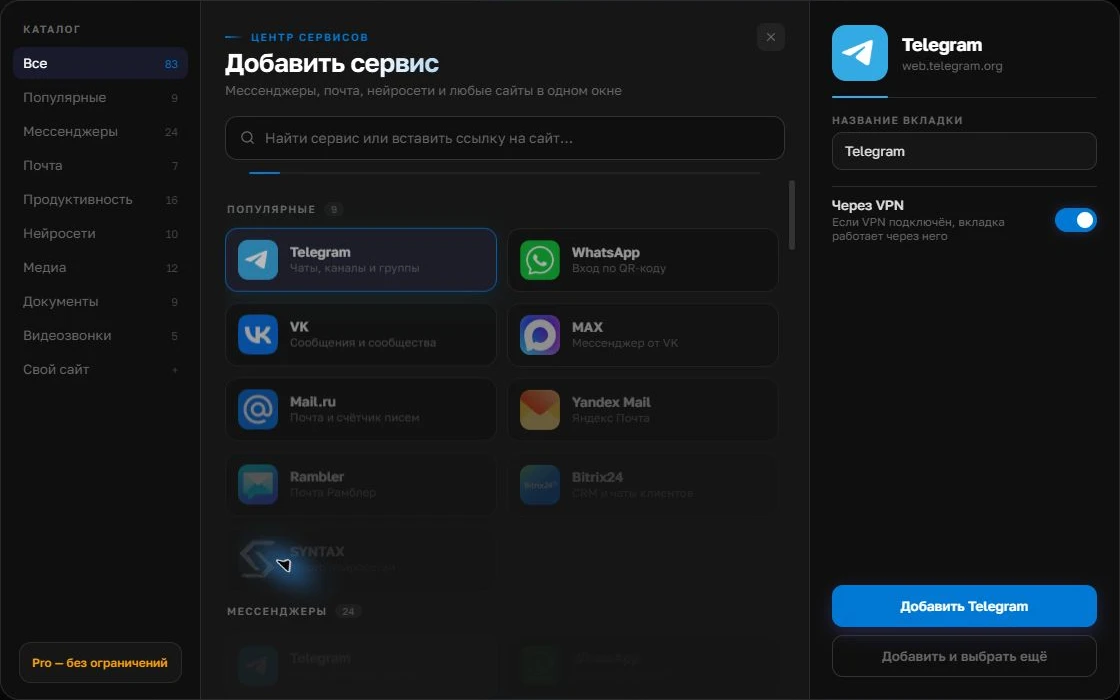
Give the account a clear name
On the right, choose a name you will recognize, such as “Work” or a project name. Add the service, then sign in through its usual website.
Open full-size screenshot ↗For a second account, add the service again. Sign in separately and verify the number or profile before your first reply. Adjust notifications to suit your work.
Build your own workspaceBring the coordinator’s channels together
In Centrio, you can keep Telegram, MAX and email as separate services. If the school has its own web portal, adding it by address requires Pro and a compatibility check. For multiple cohorts, create folders by program to avoid accidentally replying to a student from another course’s chat.
Set response hours
Urgent teacher and student messages do not need to sound around the clock. Specify contact hours and a channel for genuinely critical cases, then configure sounds and quiet mode. Send test messages to every service afterwards to check that important messages arrive and class announcements do not interrupt lesson preparation.
- Schedules belong in the learning system.
- Questions go to the designated messenger.
- Decisions are confirmed and accessible to the person responsible.
When the team needs a shared workspace
If several coordinators respond through one channel, they need roles, an inquiry queue and a handoff history. Centrio is a personal workspace, not a student management system or an omnichannel helpdesk. It suits teachers and coordinators who personally manage several of their own channels.
Frequently asked questions
Can Centrio replace a learning platform?
No. Grades, schedules, access permissions and materials remain in the LMS or other school systems.
Can I separate different courses?
Yes. Pro lets you group services into folders; instance names help distinguish courses and roles.
Sources and verification
Prepared by the Centrio editorial team. Below are official service pages and Centrio documentation. Feature availability depends on the app version and operating system.