
Do not try to transfer chats between services
MAX and Telegram are different platforms. Contacts may have accounts on only one, and installing an aggregator does not merge conversation histories. The practical goal is simpler: do not miss incoming messages and quickly recognise where to reply. Clear service names and tested notifications are enough for that.
See the setup in Centrio
Screenshots show Centrio 3.5.1 with its Russian interface. Service names and the placement of the main controls help you follow the same steps in your language.

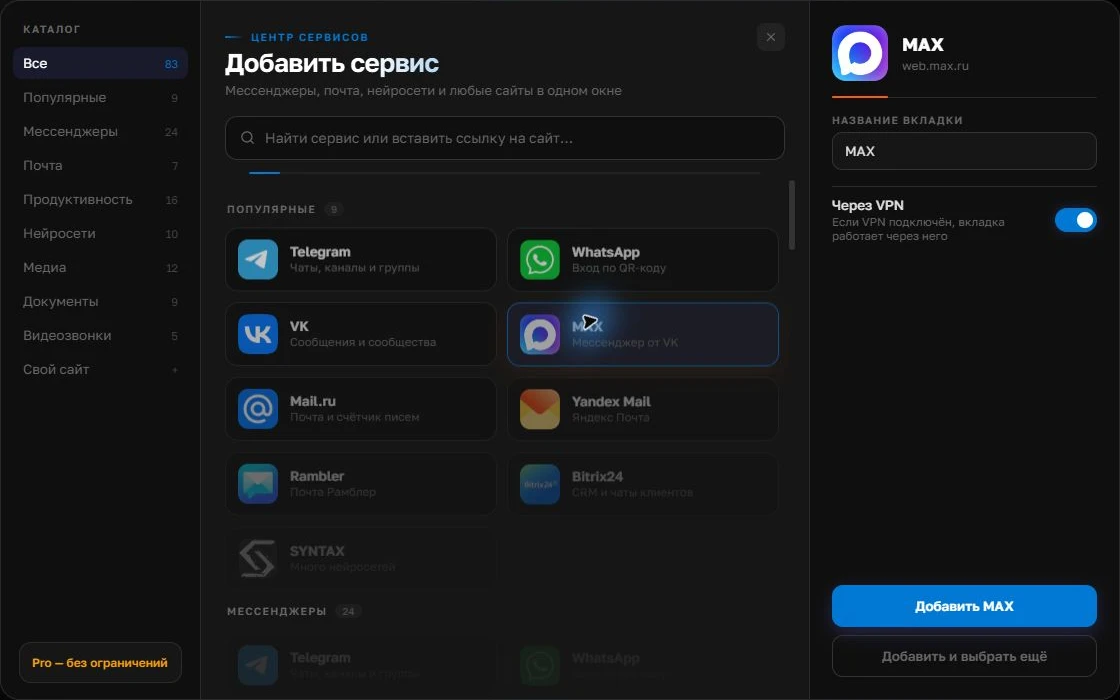
Open the service catalog
Click “+” in the left sidebar. Search for your messenger or email service and select its card.
Open full-size screenshot ↗Give the account a clear name
On the right, choose a name you will recognize, such as “Work” or a project name. Add the service, then sign in through its usual website.
Open full-size screenshot ↗For a second account, add the service again. Sign in separately and verify the number or profile before your first reply. Adjust notifications to suit your work.
Build your own workspaceFree setup
Install Centrio and add MAX and Telegram from the available catalogue. Sign into both normally, approving actions on your primary devices. Two services fit in Free, leaving room for email or WhatsApp. If your version’s catalogue lacks a service you need, adding a custom web address is a Pro feature: check the current list before choosing a plan.
- Add MAX and sign in.
- Add Telegram separately.
- Send test messages and configure notifications.
Avoid missing urgent messages
Keep sound for the channel receiving work enquiries and show a badge without sound for the other. During work hours, use Do Not Disturb only if you know which messages can wait. If you need to compare two conversations at once, Pro offers split screen; check that both interfaces fit on a small display.
When you need a different product
An aggregator works well for one person using their own accounts. Agent shifts, enquiry assignment and a shared customer history require an omnichannel platform. Centrio does not connect services through bots to create a shared queue or bypass their restrictions. Its advantage is a straightforward individual workspace with familiar web versions.
Frequently asked questions
Is there a shared MAX and Telegram chat list?
No. Both interfaces are in one app, but their conversation lists remain separate.
Is the free plan enough?
For two services, yes, if both are in the catalogue and you do not need Pro features.
Sources and verification
Prepared by the Centrio editorial team. Below are official service pages and Centrio documentation. Feature availability depends on the app version and operating system.