

The main difference: where conversations live
Beeper aims to bring supported networks into a common interface, while Centrio opens individual services’ web versions in one app. Centrio has no combined list of all chats, but you see the familiar controls of Telegram, WhatsApp and email. This is a choice between a unified inbox and retaining each platform’s interface, rather than a contest to find the best app for everyone.
See the setup in Centrio
Screenshots show Centrio 3.5.1 with its Russian interface. Service names and the placement of the main controls help you follow the same steps in your language.
Open the service catalog
Click “+” in the left sidebar. Search for your messenger or email service and select its card.
Open full-size screenshot ↗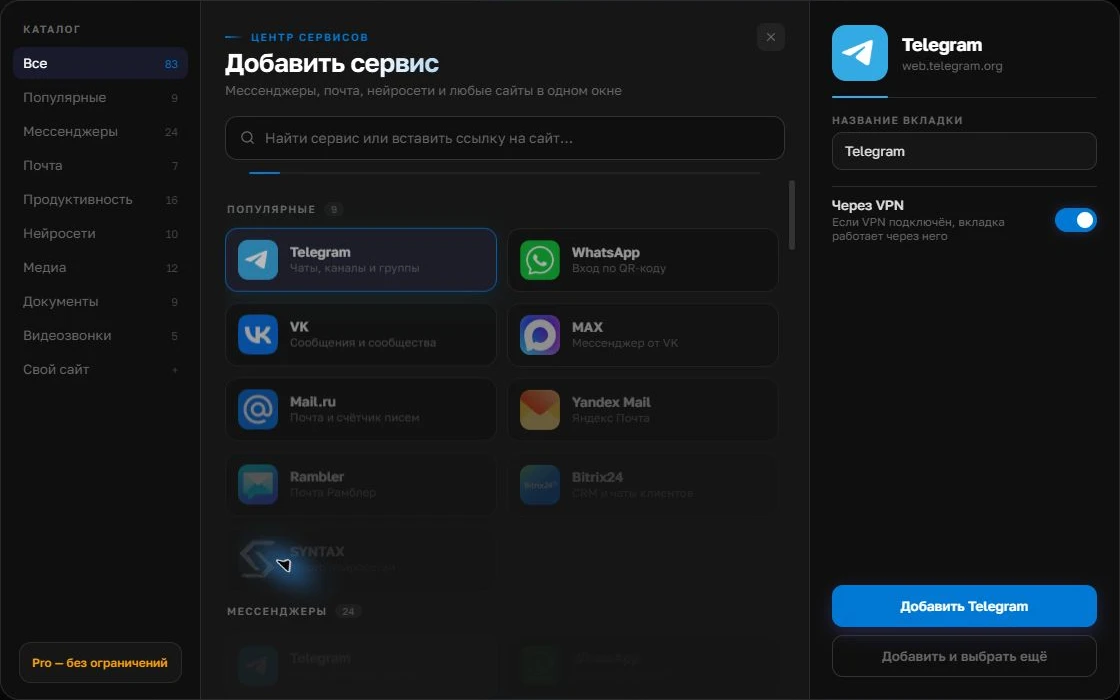
Give the account a clear name
On the right, choose a name you will recognize, such as “Work” or a project name. Add the service, then sign in through its usual website.
Open full-size screenshot ↗For a second account, add the service again. Sign in separately and verify the number or profile before your first reply. Adjust notifications to suit your work.
Build your own workspaceTest three everyday actions
List what you do each day: reply to a message, send a file, make a call or search old conversations. Then test those actions with test accounts in both apps. Supporting a network does not guarantee support for every feature of its official client. Keep your existing workflow until your essential actions have passed the test.
| Your priority | What to check |
|---|---|
| A single chat list | Which networks and actions Beeper supports |
| The service’s familiar interface | How its web version works in Centrio |
| Email and work websites alongside chats | Centrio’s catalog, custom websites and plan |
Pricing, sign-in and trust
Both products’ plans can change, so compare their current pricing pages before paying. Centrio Free allows three catalog services; Pro is needed for more services, folders and split screen. When considering Beeper, assess how each network connects and who can access messages. For corporate accounts, follow your employer’s policy.
Making a practical choice
If replying from one combined list is your main goal, start with Beeper and confirm that it supports your networks. If keeping familiar web interfaces and placing messengers alongside email and work websites matters more, try Centrio with three services. One app does not have to serve both purposes.
Frequently asked questions
Does Centrio have a unified inbox like Beeper?
No. Centrio organizes separate web services within one app.
Which works better for email and work websites?
If keeping these sites beside your messengers matters to you, check Centrio’s catalog and the custom website option in Pro.
Sources and verification
Prepared by the Centrio editorial team. Below are official service pages and Centrio documentation. Feature availability depends on the app version and operating system.